
This is Part 3 of the 3-part Solution to Exercise 5-0.
Exercise 5-0 (Part 3 / 3)
This is a fairly clever yet simple-to-understand program. This exercise demonstrates 4 things: (1) how to create a paragraph and store in the form of a vector<string> container, (2) how to display the paragraph with and without a frame, (3) how to concatenate two paragraph “pictures” vertically, (4) how to concatenate two paragraph “pictures” horizontally.
The Program Logic
- User to create a paragraph by providing multiple lines of input, via the console window.
- The program store the paragraph in the form of a vector<string> container called p – each string element corresponds the an input line. e.g. p[0] is the first line, p[1] is the second line, etc.
- A function called vcout may be used to display a vector<string> container in the form of a paragraph via the console window.
- A function called frame may be used to take in a vector<string> container and return a new vector<string> container representing a “framed” paragraph.
- A function called vcat may be used to concatenate multiple paragraph “box-like pictures” vertically. e.g. imagine two box-like paragraph pictures are stacked vertically.
- A function called hcat may be used to concatenate multiple paragraph “box-like pictures” horizontally. e.g. imagine two box-like paragraph pictures are aligned horizontally.
- An sub-function called width (used by the frame and hcat functions) is in place to ensure the paragraphs behave in a “box-like” shape when we add a frame around it, or concatenate horizontally.
- Within the main program, we apply the functions vcout, frame, vcat, and hcat in multiple combinations to demonstrate it is very easy to display the vector<string> p in the form of “box-like pictures” and in multiple ways. e.g. apply a frame around a paragraph, stack the two box-like picture paragraphs vertically / horizontally.
The Project
This is what the management tree looks like in Code::Block:
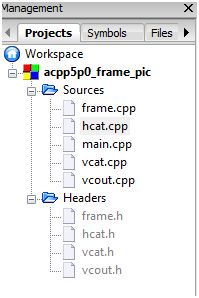
C++ Source Files
- main.cpp – this is the first program that is run during the implementation phase.
- frame.cpp – contains the frame and width functions.
- hcat.cpp – contains the hcat function.
- vcat.cpp – contains the vcat function.
- vcout.cpp – contains the vcout function.
C++ Header Files
- frame.h – declare the functions in frame.cpp.
- hcat.h – declare the functions in hcat.cpp.
- vcat.h – declare the functions in vcat.cpp.
- vcout.h – declare the functions in vcout.cpp.
Source Files
main.cpp
#include <iostream>  // cin, cout, endl, getline
#include <vector>    // vector
#include <string>    // string
#include "frame.h"   // width, frame
#include "vcat.h"    // vcat
#include "hcat.h"    // hcat
#include "vcout.h"   // vcout

using std::cin;
using std::cout;
using std::endl;
using std::getline;
using std::string;
using std::vector;

int main()
{
    string s;            // line
    vector<string> p;    // paragraph

    // read multiple lines to make a paragraph
    while (getline(cin, s))
        p.push_back(s);

    // have a play, manipulate and display paragraph (p) in multiple ways

    cout << "----------------------------------------------------\n"
            "Display: p                                          \n"
            "----------------------------------------------------\n";
    vcout(p);

    cout << "-----------------------------------------------------\n"
            "Display: frame(p)                                    \n"
            "-----------------------------------------------------\n";
    vcout(frame(p));

    cout << "-----------------------------------------------------\n"
            "Display: vcat(p, frame(p))                           \n"
            "-----------------------------------------------------\n";
    vcout(vcat(p,frame(p)));

    cout << "-----------------------------------------------------\n"
            "Display: vcat(frame(p), p)                           \n"
            "-----------------------------------------------------\n";
    vcout(vcat(frame(p),p));

    cout << "-----------------------------------------------------\n"
            "Display: hcat(p, frame(p))                           \n"
            "-----------------------------------------------------\n";

    vcout(hcat(p,frame(p)));

    cout << "-----------------------------------------------------\n"
            "Display: hcat(frame(p), p)                           \n"
            "-----------------------------------------------------\n";
    vcout(hcat(frame(p),p));

    cout << "-----------------------------------------------------\n"
            "Display: vcat(hcat(frame(p), p), hcat(p, frame(p)))  \n"
            "-----------------------------------------------------\n";
    vcout(vcat(hcat(frame(p), p), hcat(p, frame(p))));

    return 0;
}
frame.cpp
#include <string>      // string
#include <vector>      // vector
#include <algorithm>   // max

using std::string;
using std::vector;
using std::max;

string::size_type width(const vector<string>& v)
{
    string::size_type maxlen = 0;
    for(vector<string>::size_type i = 0; i != v.size(); ++i)
        maxlen = max(maxlen, v[i].size());
    return maxlen;
}

vector<string> frame(const vector<string>& v)
{
    vector<string> ret;
    string::size_type maxlen = width(v);
    string border(maxlen + 4, '*');

    // write the top border
    ret.push_back(border);

    // write each interior row, bordered by an asterisk and a space
    for (vector<string>::size_type i = 0; i != v.size(); ++i)
        ret.push_back("* " + v[i] + string(maxlen - v[i].size(), ' ') + " *");

    // write the bottom border
    ret.push_back(border);

    return ret;
}
hcat.cpp
#include <string>      // string
#include <vector>      // vector
#include "frame.h"     // width

using std::string;
using std::vector;

vector<string> hcat(const vector<string>& left, const vector<string>& right)
{
    vector<string> ret;

    // add 1 to leave a space between pictures
    string::size_type width1 = width(left) + 1;

    // indices to look at elements from left and right respectively
    vector<string>::size_type i = 0, j = 0;

    // continue until we've seen all rows from both pictures
    while (i != left.size() || j != right.size())
    {
        // construct new string to hold characters from both pictures
        string s;

        // copy a row from the left-hand side, if there is one
        if (i != left.size())
            s = left[i++];

        // pad to full width
        s += string(width1 - s.size(), ' ');

        // copy a row from teh right-hand side, if there is one
        if (j != right.size())
            s += right[j++];

        // add s to the picture we are creating
        ret.push_back(s);
    }

    return ret;
}
vcat.cpp
#include <string>      // string
#include <vector>      // vector

using std::string;
using std::vector;

vector<string> vcat(const vector<string>& top, const vector<string>& bottom)
{
    // copy the top picture
    vector<string> ret = top;

    // copy entire bottom picture (option 1 and option 2 have the same effect - pick whichever!)

    // option 1
    for (vector<string>::const_iterator it = bottom.begin();
         it != bottom.end(); ++it)
        ret.push_back(*it);

    // option 2
    /*
    ret.insert(ret.end(), bottom.begin(), bottom.end());
    */

    return ret;
}
vcout.cpp
#include <iostream>
#include <string>    // string
#include <vector>    // vector

using std::cout;
using std::endl;
using std::string;
using std::vector;

int vcout(const vector<string>& v)
{
    for (vector<string>::const_iterator iter = v.begin();
         iter != v.end(); ++iter)
    {
        cout << (*iter) << endl;
    }
    return 0;
}
Header Files
frame.h
#ifndef GUARD_FRAME_H
#define GUARD_FRAME_H

#include <string>
#include <vector>

std::string::size_type width(const std::vector<std::string>&);
std::vector<std::string> frame(const std::vector<std::string>&);

#endif // GUARD_FRAME_H
hcat.h
#ifndef GUARD_HCAT_H
#define GUARD_HCAT_H

#include <string>
#include <vector>

std::vector<std::string> hcat(const std::vector<std::string>&, const std::vector<std::string>&);

#endif // GUARD_HCAT_H
vcat.h
#ifndef GUARD_VCAT_H
#define GUARD_VCAT_H

#include <string>
#include <vector>

std::vector<std::string> vcat(const std::vector<std::string>&, const std::vector<std::string>&);

#endif // GUARD_VCAT_H
vcout.h
#ifndef GUARD_VCOUT_H
#define GUARD_VCOUT_H

#include <string>
#include <vector>

int vcout(const std::vector<std::string>&);

#endif // GUARD_VCOUT_H
Test Program
I have written the main program in a way that is easy enough to test out multiple combination of function usage (i.e. frame, vcat, and hcat) against the vector<string> p (the paragraph).
In this test, as soon as the program starts up, I provide the following 5 lines (followed by the end-of-file button. i.e. F6 for Windows).
- this is an
- example
- to
- illustrate
- framing
Test Result
this is an
example
to
illustrate
framing
^Z
----------------------------------------------------
Display: p
----------------------------------------------------
this is an
example
to
illustrate
framing
-----------------------------------------------------
Display: frame(p)
-----------------------------------------------------
**************
* this is an *
* example    *
* to         *
* illustrate *
* framing    *
**************
-----------------------------------------------------
Display: vcat(p, frame(p))
-----------------------------------------------------
this is an
example
to
illustrate
framing
**************
* this is an *
* example    *
* to         *
* illustrate *
* framing    *
**************
-----------------------------------------------------
Display: vcat(frame(p), p)
-----------------------------------------------------
**************
* this is an *
* example    *
* to         *
* illustrate *
* framing    *
**************
this is an
example
to
illustrate
framing
-----------------------------------------------------
Display: hcat(p, frame(p))
-----------------------------------------------------
this is an **************
example    * this is an *
to         * example    *
illustrate * to         *
framing    * illustrate *
           * framing    *
           **************
-----------------------------------------------------
Display: hcat(frame(p), p)
-----------------------------------------------------
************** this is an
* this is an * example
* example    * to
* to         * illustrate
* illustrate * framing
* framing    *
**************
-----------------------------------------------------
Display: vcat(hcat(frame(p), p), hcat(p, frame(p)))
-----------------------------------------------------
************** this is an
* this is an * example
* example    * to
* to         * illustrate
* illustrate * framing
* framing    *
**************
this is an **************
example    * this is an *
to         * example    *
illustrate * to         *
framing    * illustrate *
           * framing    *
           **************
This is overall a very nice program that demonstrates the ease of manipulating a vector as long as the functions are well written and in place.